Showing posts with label COMPUTER PROGRAMMING. Show all posts

Monday, 8 April 2019

CP : Reverse Order using Pointer


Write a program using a pointer to read in an array of integers and print its elements in reverse order.

Code :

#include<stdio.h>
#include<conio.h>


void main() 
{
   int  i, arr[30];
   int *ptr;

   ptr = &arr[0];

   printf("\nEnter 5 integers into array: \n");
   for (i = 0; i < 5; i++)
        {
      scanf("%d", ptr);
      ptr++;
        }

   ptr = &arr[4];

   printf("\nElements of array in reverse order are :\n");
   for (i = 5; i >0; i--)
    {
      printf("\n %d  ", i, *ptr);
      ptr--;
    }

   getch();
}

Output:


CP : Union in C


Union in C

Unions are conceptually similar to structures. The syntax to declare/define a union is also similar to that of a structure. 

The only differences are in terms of storage. In structure each member has its own storage location, whereas all members of union uses a single shared memory location which is equal to the size of its largest data member.


This implies that although a union may contain many members of different types, it cannot handle all the members at the same time. A union is declared using the union keyword.

Structure vs. Union


CP : Structure with example


C Structure is a collection of different data types which are grouped together and each element in a C structure is called member.
  • If you want to access structure members in C, the structure variable should be declared.
  • Many structure variables can be declared for the same structure and memory will be allocated for each separately.
  • It is a best practice to initialize a structure to null while declaring if we don’t assign any values to structure members.

DIFFERENCE BETWEEN C VARIABLE, C ARRAY, AND C STRUCTURE:

  • A normal C variable can hold only one data of one data type at a time.
  • An array can hold a group of data of the same data type.
  • A structure can hold a group of data of different data types and Data types can be int, char, float, double and long double, etc.
Example : 

#include <stdio.h>
struct student
{
    char name[50];
    int roll;
    float marks;
} s;

int main()
{
    printf("Enter information:\n");

    printf("Enter name: ");
    scanf("%s", &s.name);

    printf("Enter roll number: ");
    scanf("%d", &s.roll);

    printf("Enter marks: ");
    scanf("%f", &s.marks);


    printf("Displaying Information:\n");

    printf("Name: ");
    puts(s.name);

    printf("Roll number: %d\n",s.roll);

    printf("Marks: %.1f\n", s.marks);

    return 0;
}

Output : 


CP : Structures

Why Use Structures?


We have seen earlier how ordinary variables can hold one piece of information and how arrays can hold a number of pieces of information of the same data type. These two data types can handle a great variety of situations. But quite often we deal with entities that are a collection of dissimilar data types.

For example, suppose you want to store data about a book. You might want to store its name (a string), its price (a float) and a number of pages in it (an int). If data about say 3 such books is to
be stored, then we can follow two approaches:

(a) Construct individual arrays, one for storing names, another for storing prices and still another for storing a number of pages.
(b) Use a structure variable.

Let us examine these two approaches one by one. For the sake of programming, convenience assumes that the names of books would be single character long. Let us begin with a program that uses arrays.

{
char name[3] ;
float price[3] ;
int pages[3], i ;
printf ( "\nEnter names, prices and no. of pages of 3 books\n" ) ;
for ( i = 0 ; i <= 2 ; i++ )
scanf ( "%c %f %d", &name[i], &price[i], &pages[i] );
printf ( "\nAnd this is what you entered\n" ) ;
for ( i = 0 ; i <= 2 ; i++ )
printf ( "%c %f %d\n", name[i], price[i], pages[i] );
}

And here is the sample run...
Enter names, prices and no. of pages of 3 books
A 100.00 354
C 256.50 682
F 233.70 512
And this is what you entered
A 100.000000 354
C 256.500000 682
F 233.700000 512

A structure contains a number of data types grouped together. These data types may or may not be of the same type. The following example illustrates the use of this data type.

main( )
{
struct book
{
char name ;
float price ;
int pages ;
} ;
struct book b1, b2, b3 ;
printf ( "\nEnter names, prices & no. of pages of 3 books\n" ) ;
scanf ( "%c %f %d", &b1.name, &b1.price, &b1.pages ) ;
scanf ( "%c %f %d", &b2.name, &b2.price, &b2.pages ) ;
scanf ( "%c %f %d", &b3.name, &b3.price, &b3.pages ) ;
printf ( "\nAnd this is what you entered" ) ;
printf ( "\n%c %f %d", b1.name, b1.price, b1.pages ) ;
printf ( "\n%c %f %d", b2.name, b2.price, b2.pages ) ;
printf ( "\n%c %f %d", b3.name, b3.price, b3.pages ) ;
}


And here is the output...
Enter names, prices and no. of pages of 3 books
A 100.00 354
C 256.50 682
F 233.70 512

And this is what you entered
A 100.000000 354
C 256.500000 682
F 233.700000 512

Declaring a Structure

struct <structure name>
{
structure element 1 ;
structure element 2 ;
structure element 3 ;
......

......
} ;

Once the new structure data type has been defined one or more variables can be declared to be of that type. For example, the variables b1, b2, b3 can be declared to be of the type struct book, as, struct book b1, b2, b3 ;

Note the following points while declaring a structure type:
(a) The closing brace in the structure type declaration must be followed by a semicolon.
(b) It is important to understand that a structure type declaration does not tell the compiler to reserve any space in memory. All a structure declaration does is, it defines the ‘form’ of the structure.
(c) Usually, the structure type declaration appears at the top of the source code file, before any variables or functions are defined. In very large programs they are usually put in a separate header file, and the file is included (using the preprocessor directive #include) in whichever program we want to use this structure type.


Tuesday, 2 April 2019

CP : Pointer explanation

What are the Pointers?


pointer is a variable whose value is the address of another variable, i.e., direct address of the memory location.

The general form of a pointer variable declaration is −
type *var-name;

type is the pointer's base type
var-name is the name of the pointer variable
asterisk * used to declare a pointer is the same asterisk used for multiplication.


Take a look at some of the valid pointer declarations −
int    *ip;    /* pointer to an integer */
double *dp;    /* pointer to a double */
float  *fp;    /* pointer to a float */
char   *ch     /* pointer to a character */


How to Use Pointers?

There are a few important operations, which we will do with the help of pointers very frequently. 
(a) We define a pointer variable, 
(b) assign the address of a variable to a pointer and 
(c) finally access the value at the address available in the pointer variable. 

This is done by using unary operator * that returns the value of the variable located at the address specified by its operand. The following example makes use of these operations −
EXAMPLE: 
#include <stdio.h>
int main () 
{
   int  var = 20;   /* actual variable declaration */
   int  *ip;        /* pointer variable declaration */
   ip = &var;  /* store address of var in pointer variable*/
   
  printf("Address of var variable: %x\n", &var  );
  /* address stored in pointer variable */
  printf("Address stored in ip variable: %x\n", ip );
   /* access the value using the pointer */
   printf("Value of *ip variable: %d\n", *ip );
   return 0;
}


Reference operator (&) and Dereference operator (*)


& "is calledthe reference operator. It gives you the address of a variable.
Likewise, there is another operator that gets you the value from the address, it is called a dereference operator *."

Explanation


Friday, 29 March 2019

CP: Swap two numbers

Que: Write a program to swap two numbers. 

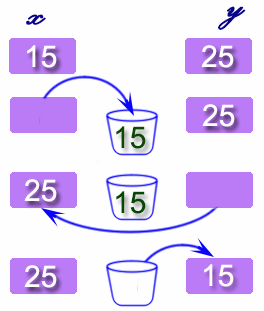
Swapping two variables refers to mutually exchanging the values of the variables. Generally, this is done with the data in memory.

The simplest method to swap two variables is to use a third temporary variable : 


Code:

#include <stdio.h>

int main()
{
  int x, y, t;

  printf("Enter two integers\n");
  scanf("%d%d", &x, &y);

  printf("Before Swapping\nFirst integer = %d\nSecond integer = %d\n", x, y);

  t = x;
  x = y;
  y = t;

  printf("After Swapping\nFirst integer = %d\nSecond integer = %d\n", x, y);

  return 0;

}
_________________________________________________________________________________
Swapping of two numbers without third variable

Code:

#include <stdio.h>

int main()
{
   int a, b;

   printf("Input two integers (a & b) to swap\n");
   scanf("%d%d", &a, &b);

   a = a + b; 
   b = a - b;
   a = a - b;

   printf("a = %d\nb = %d\n",a,b);
   return 0;

}


CP: Total number of positive, negative and zero value in an array


Que:  Write a program to calculate a total number of positive, negative and zero value in an array using UDF.

Code: 

#include<stdio.h>

int main()

{
    int size,i,a[10];
    int positive=0, negative=0, zero=0;

    printf("\n Enter the size of array:  ");
    scanf("%d", &size);

    printf("\n Enter your array elements\n");

    for(i=0;i<size;i++)
    {
        scanf("%d", &a[i]);
    }

    for(i=0;i<size;i++)
    {
        if(a[i]>0)
        {
            positive++;
        }
        else if(a[i]<0)
        {
            negative++;
        }
        else
        {
            zero++;
        }

    }

    printf("\n total positive no: %d", positive);
    printf("\n total negative no: %d", negative);
    printf("\n total zero no: %d", zero);

    return 0;
}


Output: 


Thursday, 28 March 2019

CP: Factorial using recursion in UDF.


Que: Write a program to calculate Factorial using recursion in UDF.

A function that calls itself is known as a recursive function. And, this technique is known as recursion.


How recursion works?


The recursion continues until some condition is met to prevent it.
To prevent infinite recursion, if...else statement (or similar approach) can be used where one branch makes the recursive call and other doesn't.
Code: 
#include <stdio.h>
long int dofactorial(int n);int main()
{    
     int n;    
     printf("\mEnter a positive integer: ");    
     scanf("%d", &n);    

     printf("\nFactorial of %d = %ld \n", n, dofactorial(n));    
     return 0;
}
long int dofactorial(int n)
{    
     if (n >= 1)        
     return n*dofactorial(n-1);    
     else        
     return 1;
}

Output:


CP: factorial

Que: Factorial program in C using a for loop


The factorial of a positive number n is given by:
factorial of n (n!) = 1*2*3*4....n
The factorial of a negative number doesn't exist. And the factorial of 0 is 1
Code: 

#include <stdio.h>

int main()
{
  int c, n, fact = 1;

  printf("Enter a number to calculate its factorial= ");
  scanf("%d", &n);

  for (c = 1; c <= n; c++)
    fact = fact * c;

  printf("Factorial of %d = %d\n", n, fact);

  return 0;

}

Output: 


CP: Library function for the string.


Que: Write a program to demonstrate the Library function for the string.

Code:

#include <stdio.h>
void myfunction(char str[]);

int main()
{
    char str[50];
    printf("\n Enter your name : ");
    gets(str);
    myfunction(str);     // Passing string to a function.
    return 0;
}

void myfunction(char str[])
{
    printf("\n Output using my function: ");
    puts(str);

}

Output: 


CP: Understand Fucntion


Que: What is Function? Explain it in detail. 

A function is a block of statements that performs a specific task. 
Suppose you are building an application in C language and in one of your program, you need to perform the same task more than once. In such a case, you have two options –
a) Use the same set of statements every time you want to perform the task
b) Create a function to perform that task, and just call it every time you need to perform that task.
Using option (b) is a good practice and a good programmer always uses functions while writing codes in C.

Types of functions

1) Predefined standard library functions – such as puts()gets()printf()scanf() etc – These are the functions which already have a definition in header files (.h files like stdio.h), so we just call them whenever there is a need to use them.
2) User Defined functions – The functions that we create in a program are known as user-defined functions.

Why we need functions in C

Functions are used because of following reasons –
a) To improve the readability of code.
b) Improves the reusability of the code, same function can be used in any program rather than writing the same code from scratch.
c) Debugging of the code would be easier if you use functions, as errors are easy to be traced.
d) Reduces the size of the code, duplicate set of statements are replaced by function calls

The syntax of a function

return_type function_name (argument list)
{
    Set of statements  Block of code
}

return_type: Return type can be of any data type such as int, double, char, void, short etc. Don’t worry you will understand these terms better once you go through the examples below.
function_name: It can be anything, however it is advised to have a meaningful name for the functions so that it would be easy to understand the purpose of function just by seeing it’s name.
argument list: Argument list contains variables names along with their data types. These arguments are kind of inputs for the function. For example – A function which is used to add two integer variables, will be having two integer argument.
Block of code: Set of C statements, which will be executed whenever a call will be made to the function.
----------------------------- ****************-----------------*********************------------------------
Lets take an example – Suppose you want to create a function to add two integer variables.
Let’s split the problem so that it would be easy to understand –
The function will add the two numbers so it should have some meaningful name like sum, addition, etc. For example, let's take the name addition for this function.
return_type addition(argument list)

This function addition adds two integer variables, which means I need two integer variable as input, lets provide two integer parameters in the function signature. The function signature would be –
return_type addition(int num1, int num2)

The result of the sum of two integers would be integer only. Hence function should return an integer value – I got my return type – It would be integer –
int addition(int num1, int num2);

Now you can implement the logic in C program like this:

Example1: Creating a user-defined function addition()


#include <stdio.h>


int main()
{
     int var1, var2, result;
     printf("\nEnter number 1: ");
     scanf("%d",&var1);
     printf("Enter number 2: ");
     scanf("%d",&var2);


     result = addition(var1, var2);
     printf ("\nOutput: %d\n", result);

     return 0;
}
int addition(var1, var2)
{
     int sum;
     sum = var1+var2;
     return sum;
}

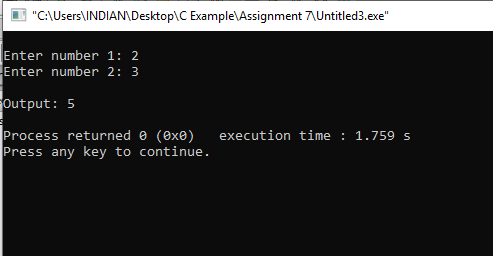
Output:


Example2: Creating a void user defined function that doesn’t return anything


#include <stdio.h>
/* function return type is void and it doesn't have parameters*/
void introduction()
{
    printf("Hi\n");
    printf("My name is DDZALA\n");
    printf("How are you?");

}

int main()
{

     introduction();
     return 0;
}

Output:

Few Points to Note regarding functions in C:
1) main() in C program is also a function.
2) Each C program must have at least one function, which is main().
3) There is no limit on number of functions; A C program can have any number of functions.
4) A function can call itself and it is known as “Recursion“.

C Functions Terminologies that you must remember

return type: Data type of returned value. It can be void also, in such case function doesn’t return any value.
Note: for example, if function return type is char, then function should return a value of char type and while calling this function the main() function should have a variable of char data type to store the returned value.


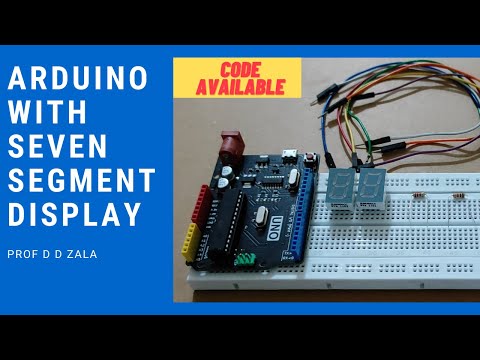
LAB 7 Arduino with Seven Segment Display || Arduino Tutorial || Code and Circuit Diagram || Project

  LAB 7 Arduino with Seven Segment Display || Arduino Tutorial || Code and Circuit Diagram || Project Dear All We will learn how to Connec...